Gemini 3.5 Flash-Lite vs 3.1 Pro: Price & Benchmarks

By Emma Reed
MyClaw Editorial
MyClaw
Run Best-in-Class AI Agents Now
Run OpenClaw or Hermes Agent on managed MyClaw hosting, so your AI agent stays online, updated, and ready for real work.
Start HostingAI Takeaway
- Which model is the better default? Gemini 3.5 Flash-Lite is the practical choice for fast, frequent, verifiable work. Gemini 3.1 Pro is better for complex work where a weak plan can waste the entire run.
- How much cheaper is Flash-Lite? It costs $0.30 per million input tokens and $2.50 per million output tokens. Pro costs $2 and $12 per million up to 200K tokens, rising to $4 and $18 above that threshold.
- Can Flash-Lite match Pro? On some evaluations, yes. Both score 54.2% on SWE-Bench Pro, but Pro leads 73.8% to 54.0% on Terminal-Bench 2.1.
- Which one handles long context better? Pro has stronger retrieval at 128K. Near the full 1M-token limit, both models lose a large amount of recall.
- Do you need to choose only one? No. Flash-Lite can execute routine work while Pro handles exceptions, review, and high-impact decisions.
Gemini 3.5 Flash-Lite vs 3.1 Pro at a Glance
This is a throughput-versus-depth decision. Flash-Lite processes large volumes with low latency; Pro spends more time and money on difficult reasoning. Both accept text, images, video, audio, and PDFs, with up to 1M input tokens and 64K output tokens under Google’s current model specifications.
| Category | Gemini 3.5 Flash-Lite | Gemini 3.1 Pro |
|---|---|---|
| Best fit | Extraction, routing, document processing, frequent subagent tasks | Hard coding, complex research, planning, consequential decisions |
| Status | Generally available | Preview |
| Model ID | gemini-3.5-flash-lite | gemini-3.1-pro-preview |
| Context / max output | 1M / 64K | 1M / 64K |
| Standard API price | $0.30 input / $2.50 output per 1M tokens | $2 / $12 up to 200K; $4 / $18 above 200K |
| Published speed signal | About 350 output tokens per second | No directly comparable published figure |
| Typical thinking setup | minimal for routine throughput | More reasoning for difficult, high-value work |
The Gemini 3.1 Pro model overview has its full specification. Start with Flash-Lite when errors are easy to catch; pay for Pro when one weak decision can spoil the run.
Price per Token Is Not the Same as Cost per Task
Flash-Lite Has the Clear Sticker-Price Advantage
For prompts below 200K tokens, Flash-Lite input is 85% cheaper than Pro, while output is about 79% cheaper. Pro’s long-context tier makes the difference larger once a prompt crosses 200K.
For a monthly workflow using 20 million uncached input tokens and 2 million output tokens, Flash-Lite costs about $11. Pro costs about $64 if requests stay below 200K, or $116 if long-context pricing applies. That gap is large enough to change how work should be routed.
Count Retries and Cleanup Too
Token price is only the first line of the bill. A cheap run that fails twice and needs repair may cost more than one clean Pro run. Artificial Analysis measured roughly 0.6 minutes per task for 3.5 Flash-Lite, down from 1.0 minute for 3.1 Flash-Lite, while average model cost rose from about $0.04 to $0.09 per task.
Use this calculation instead:
(model spend + review hours × hourly cost + repair cost) ÷ accepted tasks
If Pro-level reasoning is attractive but the price is not, the recent DeepSeek V4 Pro vs Gemini 3.1 Pro comparison covers a lower-cost alternative.
Gemini 3.5 Flash-Lite Matches 3.1 Pro in Some Benchmarks
Google’s published benchmark table makes Flash-Lite look stronger than its name suggests. Compare only results with matching benchmark versions, harnesses, and thinking settings.
| Benchmark | 3.5 Flash-Lite | 3.1 Pro | Practical Signal |
|---|---|---|---|
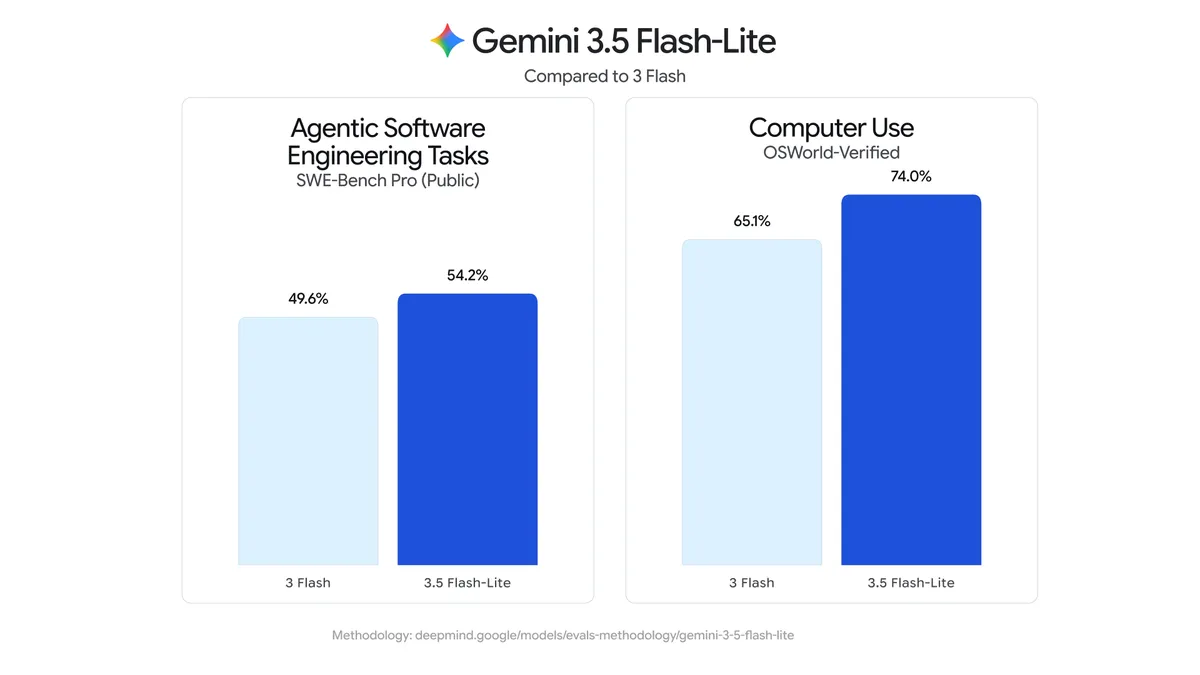
| SWE-Bench Pro | 54.2% | 54.2% | A tie on this software issue-resolution benchmark |
| Terminal-Bench 2.1 | 54.0% | 73.8% | Pro is safer for difficult command-line work |
| OSWorld-Verified | 74.0% | 76.2% | Capability is close, but API availability can differ |
| GDPVal-AA v2 | 1140 | 965 | Flash-Lite leads on this knowledge-work evaluation |
| MRCR v2 at 128K | 72.2% | 84.9% | Pro retains more information in large working contexts |
| MRCR v2 at 1M | 21.3% | 26.3% | A 1M window does not guarantee reliable recall |
Equal Coding Scores Do Not Mean Equal Coding Agents
SWE-Bench Pro focuses on resolving software issues. Terminal-Bench tests longer, messier command-line sequences. A model can produce a good patch once the problem is clear yet struggle to investigate, recover from a failed command, or choose the next step.
Flash-Lite fits a focused component edit or test fix. Pro is safer for infrastructure failures, risky migrations, or debugging across several systems.
A 1M Context Window Is Capacity, Not Memory
Both models accept a million tokens, but neither retrieves every buried detail at that size. Loading an entire repository or archive may make the result less dependable.
Retrieve relevant files first, summarize stale history, and test at the context size normally used. A clean 80K prompt is usually easier to trust and verify than a noisy 800K dump.
Thinking Level Can Change the Result
Use Minimal Thinking for Throughput
Flash-Lite defaults to minimal, which suits narrow tasks with an obvious finish line: classify a message, extract invoice fields, translate a product feed, route a support request, or return validated JSON. Minimal thinking keeps the response quick and limits reasoning-token spend.
Raise the Level Before Switching Models
For code, terminal work, or API calls, test Flash-Lite at medium or high. More thinking may improve planning and recovery but adds latency and billable output. It can still cost far less than sending every request to Pro.
The names are easy to confuse: Gemini 3.5 Flash is not Gemini 3.5 Flash-Lite. It is a separate, more capable model with different pricing and benchmark results, so Flash scores should not be copied into a Flash-Lite comparison.
Choose Flash-Lite for Scale and Pro for Judgment
Choose Flash-Lite for Frequent, Reversible Work
Flash-Lite is the better default when output can be checked automatically or corrected cheaply:
- extracting fields from receipts, PDFs, or forms;
- inbox triage, tagging, translation, and routing;
- monitoring pages and producing first-pass summaries;
- simple code changes with a reliable test suite;
- parallel subagents that collect evidence or generate options.
These jobs make failures visible. A schema validator, unit test, or approval step can catch a weak result without slowing every run.
Choose Pro When Mistakes Are Expensive
Use Pro for architecture decisions, unfamiliar debugging, large-repository planning, ambiguous research, and final review. Its price makes sense when stronger judgment prevents repeated failures or a bad production change.
For coding, keep the handoff simple: Flash-Lite investigates a bounded issue and runs tests; Pro reviews an uncertain plan. The same pattern works in a hosted coding-agent workflow. If neither fits, compare alternatives in the MyClaw model directory.
Test Both Models on Work You Actually Need Done
A browser chat is not a fair agent test. The models need identical files, tools, permissions, prompts, thinking settings, and finish lines. MyClaw keeps the environment fixed in a managed, always-on OpenClaw or Hermes Agent workspace while the model changes.
Step 1: Pick a Task With a Finish Line
Choose something that can clearly pass or fail: extract fields from 100 messy invoices, fix one failing test, or produce a competitor brief with cited evidence. Write down three pass conditions and set a time or spending limit.
Step 2: Start Fresh and Change Only the Model
Run two clean sessions with identical instructions, files, tools, permissions, and success checks. Do not switch models halfway through an old conversation; the existing history makes the result harder to trust.
Step 3: Keep the Winner Moving
Record completion, tool errors, retries, elapsed time, cost, and cleanup. Save and schedule the better setup when the job repeats. Keep the other model for review, exceptions, or provider fallback.
Check Availability and API Behavior Before Migrating
Google presents 3.5 Flash-Lite as the next step for high-volume Flash-Lite workloads, not a universal Pro replacement. A migration requires more than changing the model ID:
- Replace older
thinking_budgetlogic with the supportedthinking_levelsetting. - Remove deprecated sampling parameters.
- Retest structured output and function-call payloads.
- Confirm rate limits, regional access, and tool support on the exact API surface.
- Keep a fallback while Pro remains in Preview.
Documentation can differ across Gemini surfaces, especially for Computer Use. Confirm behavior where production requests run. For an always-running agent, a managed OpenClaw workspace keeps the runtime, tools, updates, and model configuration together.
Conclusion
In the Gemini 3.5 Flash-Lite vs 3.1 Pro decision, Flash-Lite is the stronger default for high-volume, latency-sensitive work that can be verified. Pro remains worth its higher price for difficult terminal coding, deeper reasoning, ambiguous tasks, and stronger long-context retrieval.
For many workflows, the sensible setup is Flash-Lite for routine execution and Pro for escalation or review. Keep the routing rule simple, test both on completed work, and choose by cost per accepted result—not by the model name or one benchmark win.
Skip the Setup, Run Best-in-Class AI Agents Now
Launch a managed OpenClaw or Hermes Agent workspace in minutes, with always-on hosting, updates, and support handled by MyClaw.
Get Started