Genspark vs Claude: Chat, Cowork, Design, and Pricing Compared

By Alex Morgan
MyClaw Editorial
MyClaw
Run Best-in-Class AI Agents Now
Run OpenClaw or Hermes Agent on managed MyClaw hosting, so your AI agent stays online, updated, and ready for real work.
AI Takeaway
- Which is better overall? Claude is the stronger choice for careful reasoning, long documents, writing, and coding. Genspark is better when you want multiple AI models plus research, slides, images, video, and other creation tools in one workspace.
- Genspark Claw or Claude Cowork? Claw is a flexible multi-model assistant with cloud and local modes. Cowork is a better fit when the work depends on Claude, connected services, or files and apps on your computer.
- Which is better for design? Genspark offers a broader media-production suite. Claude Design feels more like a collaborative design partner for prototypes, one-pagers, slides, and design-system work.
- Which offers better value? Genspark bundles more creation tools, while Claude has the lower entry price. Genspark meters many agent and advanced creation tasks with credits; Claude includes Cowork and Design on paid plans, but they share usage limits.
Genspark vs Claude: Quick Comparison
Genspark sells breadth, while Claude offers a more focused Anthropic experience. One surrounds several models with creation tools; the other brings Claude into chat, coding, knowledge work, and design.
| Category | Genspark | Claude |
|---|---|---|
| Best for | Multi-model research and content production | Reasoning, writing, coding, and document work |
| Models | Multiple providers | Anthropic models |
| Agent product | Genspark Claw | Claude Cowork |
| Visual work | Design, Slides, Image, and Video | Claude Design and presentation creation |
| Local files | Claw local mode | Cowork desktop access |
| Entry paid plan | $24.99/month | $20/month |
| Main tradeoff | Credit usage and a separate Claw cloud fee | Shared usage limits and fewer media tools |
Choose the focused ecosystem if most of your work already belongs in Claude. Choose the broader toolbox if the job regularly moves between research, files, slides, and media.
The Biggest Difference Is the Product Around the Model
Genspark Is a Multi-Model Workspace
Genspark combines AI Chat, Super Agent, Docs, Sheets, Slides, Design, Code, and media generation. A research task can become a deck and supporting visuals without moving across several subscriptions.
That convenience is its main advantage. If the toolbox is appealing but the credit model is not, compare Genspark AI alternatives by the result you need: presentations, cited research, or autonomous execution.
Claude Is a Claude-Native Ecosystem
A paid Claude plan brings Anthropic's models to Chat, Projects, Cowork, Code, Design, Skills, and connectors, depending on availability.
It is the cleaner choice when you mainly want Claude rather than a large image and video model catalog.
Can You Use Claude Inside Genspark?
Eligible Genspark plans provide Claude models, but model access is not a direct Claude subscription. Context handling, limits, instructions, tools, and settings can differ. Claude Code, Cowork, and Design remain Anthropic products.
Direct access is simpler when Claude is your default model and you want Anthropic's native features. Genspark makes more sense when Claude is one specialist among several.
Genspark AI vs Claude for Everyday Work
Research and Source-Backed Work
Genspark can search, organize findings, and move directly into a report, sheet, or deck. It works well for market scans, sales research, and early competitive work.
Claude is better when judgment matters: challenging weak claims, comparing conflicting documents, and restructuring an argument. A recurring research agent workflow can preserve the brief, evidence, and report structure between runs.
With either product, open important sources, check dates, and distinguish a confident summary from decision-ready evidence.
Writing, Documents, and Coding
Claude handles nuanced writing and long documents well, including tone and structure across revisions.
Genspark can create code, but Claude's native environment better suits repositories, tests, debugging, and multi-file changes. A hosted coding agent workflow keeps builds and reviews moving outside one chat.
Slides, Images, Video, and Packaged Outputs
Genspark moves from text to slides, images, audio, or video without a separate tool stack. Claude produces strong narratives; Genspark wins on media variety.
Genspark Claw vs Claude Cowork
Scheduled Cloud Tasks
Genspark Claw can run on a dedicated cloud computer, schedule tasks, monitor services, and report through messaging channels. Messages, tools, schedules, and heartbeat checks can consume credits.
Claude Cowork also runs recurring tasks with cloud files, plugins, and connectors. Local work is different: a task using files or apps stored only on your computer still needs that machine. A cloud brief may run while the laptop sleeps; reorganizing Downloads cannot.
Local Files and Computer Use
Claw local mode lets you select a working folder, but Genspark describes it as guidance rather than a hard boundary; the agent may reach outside it if the task requires. Cowork uses explicit folder and app permissions and asks before higher-impact actions.
For either product, use a dedicated folder, keep backups, and avoid exposing an entire drive.
Which Agent Fits Your Workday?
Choose Claw for multiple models, messaging, creation tools, and cloud computing. Choose Cowork for Claude-native work in local documents or connected apps. Session Logs can preserve context across longer projects.
Genspark vs Claude Design
Choose Genspark for Broader Asset Production
Genspark Design covers graphics, slides, reference images, and brand assets. It suits campaigns that need several formats quickly.
Choose Claude Design for Iterative Refinement
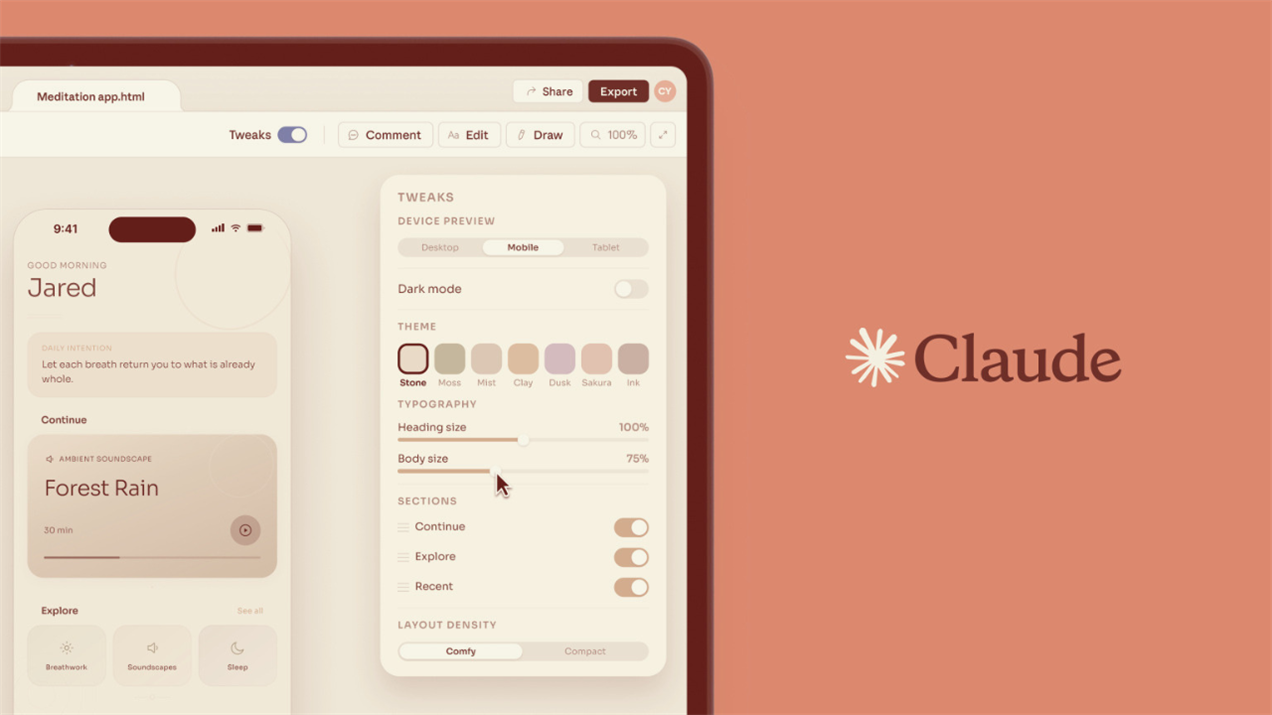
Claude Design is more conversational: describe, comment, edit, and refine. Its design-system support suits prototypes and one-pagers that need several feedback rounds.
Give both products the same eight-slide deck or branded one-pager, then compare:
- instruction following and text accuracy;
- brand consistency and layout quality;
- editable text, charts, and components;
- export quality;
- time and credits needed to reach an approved version.
A polished screenshot can hide a frustrating file. For PowerPoint delivery, a PowerPoint/PPTX skill can inspect templates, notes, charts, overflow, and visual consistency.
The winner may change with the artifact. Genspark can be the faster route to campaign variations, while Claude Design can feel better during a longer back-and-forth over hierarchy, copy, and interaction details.
Pricing, Credits, and Real Usage Limits
Genspark Plus currently costs $24.99 per month; Claude Pro costs $20. Genspark offers zero-credit core chat under current paid-plan terms, but many agent runs and advanced creation tasks use shared credits. A Claw cloud computer requires a separate subscription.
Claude Pro includes Cowork and Claude Design, but they share usage capacity with the rest of Claude. Multi-step Cowork jobs can reach limits faster than ordinary chat; higher tiers mainly add capacity.
Before paying for a year, test one normal week. Track finished work, retries, cleanup, and interruptions—not prompts alone.
An occasional deck may barely affect Genspark credits; daily agents will. Claude Pro may feel generous for writing but tight once several Cowork jobs call tools.
Run Your AI Workflows 24/7 with MyClaw
 Sometimes the bigger need is a stable place for files, tools, schedules, and working rules while the model changes with the task.
MyClaw provides a managed OpenClaw workspace with isolated hosting, flexible models, skills, connected tools, files, schedules, backups, and browser or messaging access. It does not replace Claude's reasoning or Genspark's creative suite; it turns a useful task into a workflow that stays available.
Step 1: Launch One Focused Workspace
Start with one job that has a clear finish line: a morning competitor brief, weekly content plan, inbox triage, price watch, or repository health report. “Automate everything” is not a useful first assignment.
Step 2: Connect Only What the Job Needs
Choose the model, then add the files, apps, repositories, and messaging channels required for that workflow. Narrow access makes the setup easier to understand and safer to review.
Step 3: Put It on a Schedule
Run the task manually once, fix unclear instructions, and define when approval is required. Then schedule it. The satisfying moment is not the first impressive answer; it is opening your inbox or chat and finding a useful report already waiting.
Which One Should You Choose?
- Choose Genspark if you want multiple models, broad research, slides, images, video, and packaged outputs in one subscription.
- Choose Claude if you care most about reasoning, writing, coding, long documents, local file work, or Anthropic's native Cowork and Design experiences.
- Choose MyClaw if recurring work needs a private hosted agent, flexible models, skills, connectors, files, schedules, and access after your laptop closes.
They can also work together: Claude handles judgment, Genspark creates assets, and a persistent workspace runs the repeatable process.
Conclusion: Genspark vs Claude Comes Down to How You Work
The Genspark vs Claude choice is straightforward once the job is clear. Genspark offers greater breadth and faster movement across media. Claude offers a focused environment for reasoning, writing, coding, and document work. If the task needs to become a repeatable operation rather than another chat, give the agent a workspace built to stay online.
Skip the Setup, Run Best-in-Class AI Agents Now
Launch a managed OpenClaw or Hermes Agent workspace in minutes, with always-on hosting, updates, and support handled by MyClaw.