Manus Reviews 2026: Capabilities, Costs, and an Honest Verdict

By Nathan Cole
MyClaw Editorial
MyClaw
Run Best-in-Class AI Agents Now
Run OpenClaw or Hermes Agent on managed MyClaw hosting, so your AI agent stays online, updated, and ready for real work.
AI Takeaway
- Is Manus AI worth it in 2026? Yes, if you regularly delegate bounded, multi-step digital tasks, can review the results, and can tolerate variable per-task costs.
- What is Manus best at? Web research, browser-based data gathering, file and code work, data visualization, slides, and rapid website prototypes.
- What is the biggest drawback? Credit use varies by task, while outputs may still require fact-checking, correction, or manual takeover.
- Who should use it? Freelancers, founders, analysts, marketers, and small teams with clear tasks and reviewable outputs.
- When is another setup better? Consider a private, persistent agent when recurring workflows, customization, infrastructure control, or model and tool choice matter more than convenience.
What Manus AI Is in 2026
Manus is a general-purpose AI agent designed to complete digital work rather than merely discuss it. Give it a goal and it can plan steps, browse websites, run code, manipulate files, and return a report, presentation, dataset, or prototype. An LLM generates an answer; an agent adds tools and an execution loop that moves the task forward. Our guide to AI agents vs. LLMs explains the distinction.
Manus is now part of Meta. The product packages models, browsers, virtual machines, and creation tools into one service, so you do not need to provision a server or assemble an agent stack before starting.
The real test is whether those capabilities produce repeatable results. Judge the finished work, intervention required, cost, and reliability—not just the demo.
What Can Manus AI Actually Do?
Research and Browser Tasks
Manus can search across sources, extract structured data, and assemble findings into a deliverable. Wide Research can split large requests into parallel subtasks, which suits market maps, company lists, and product comparisons.
Its Cloud Browser runs in an isolated environment. Browser Operator can instead work in an authorized local browser session, using accounts you are already signed into. You can watch the activity and take control, but CAPTCHAs, multifactor authentication, sensitive actions, or difficult page interactions may still interrupt the task.
Data, Slides, and Documents
Upload a spreadsheet or structured dataset and Manus can analyze patterns, create charts, and package the results as a report, dashboard, webpage, or slide deck. Its presentation workflow can research a subject, draft the narrative, generate visuals, add speaker notes, and export an editable PowerPoint file.
Data analysis and slide creation are among its strongest use cases because the output is tangible and reviewable. A polished chart can still rest on a bad assumption, so verify calculations, citations, and recommendations before presenting them.
Websites, Code, and Local Computer Work
Manus can scaffold websites and applications, run code, create files, and connect to services such as Gmail, calendars, GitHub, project-management systems, and databases. Custom API and MCP connectors extend the range.
The “My Computer” feature can work with authorized local folders and command-line tools for file organization, scripts, development, and remote tasks. Outputs are not automatically production-ready: code needs testing and security review, and local access should stay limited to what the job requires.
Where Manus Performs Best
It Delivers an Artifact, Not Just Advice
Manus is most convincing when the job has a clear finish line: collect 50 companies and deliver a spreadsheet, analyze a dataset and create a deck, or turn a brief into a prototype. In those cases, the agent can reduce the handoffs between research, analysis, writing, and formatting.
The value is fewer manual handoffs, not perfect accuracy. You review and refine the result instead of assembling every intermediate step.
Cloud Execution Reduces Setup Friction
A ready-made cloud environment is valuable when you want to start immediately. Manus handles the browser, file system, code runtime, and output generation behind the interface. That makes it accessible to non-developers and useful for one-off jobs that do not justify building a custom workflow.
Because tasks run in the cloud, they can continue while you work elsewhere. If the work becomes recurring, evaluate the full AI agent platform—runtime, permissions, memory, logs, uptime, and maintenance—not only the task interface.
Visible Progress Makes Intervention Practical
Manus shows what it is doing, and you can intervene when a browser step or authentication flow needs help. This visibility makes failures easier to diagnose and gives you a chance to redirect a task before it spends more time on the wrong path.
This is not complete control, but it is better than opaque automation. Treat Manus like a fast operator whose work still requires review.
The Limits Behind the Impressive Demos
Reliability Still Depends on Task Design
Clear, bounded goals are a better fit than ambiguous workflows with branching rules, exceptions, and irreversible actions. “Research these 30 companies using these sources and return a table with five defined fields” gives the agent a measurable endpoint. “Handle our business development” leaves too much room for interpretation.
For important work, specify the objective, permitted sources, output format, stop conditions, and approval points. That reduces wandering and reveals when fixed automation would be more appropriate.
Manus AI Pricing: Why Cost per Task Varies
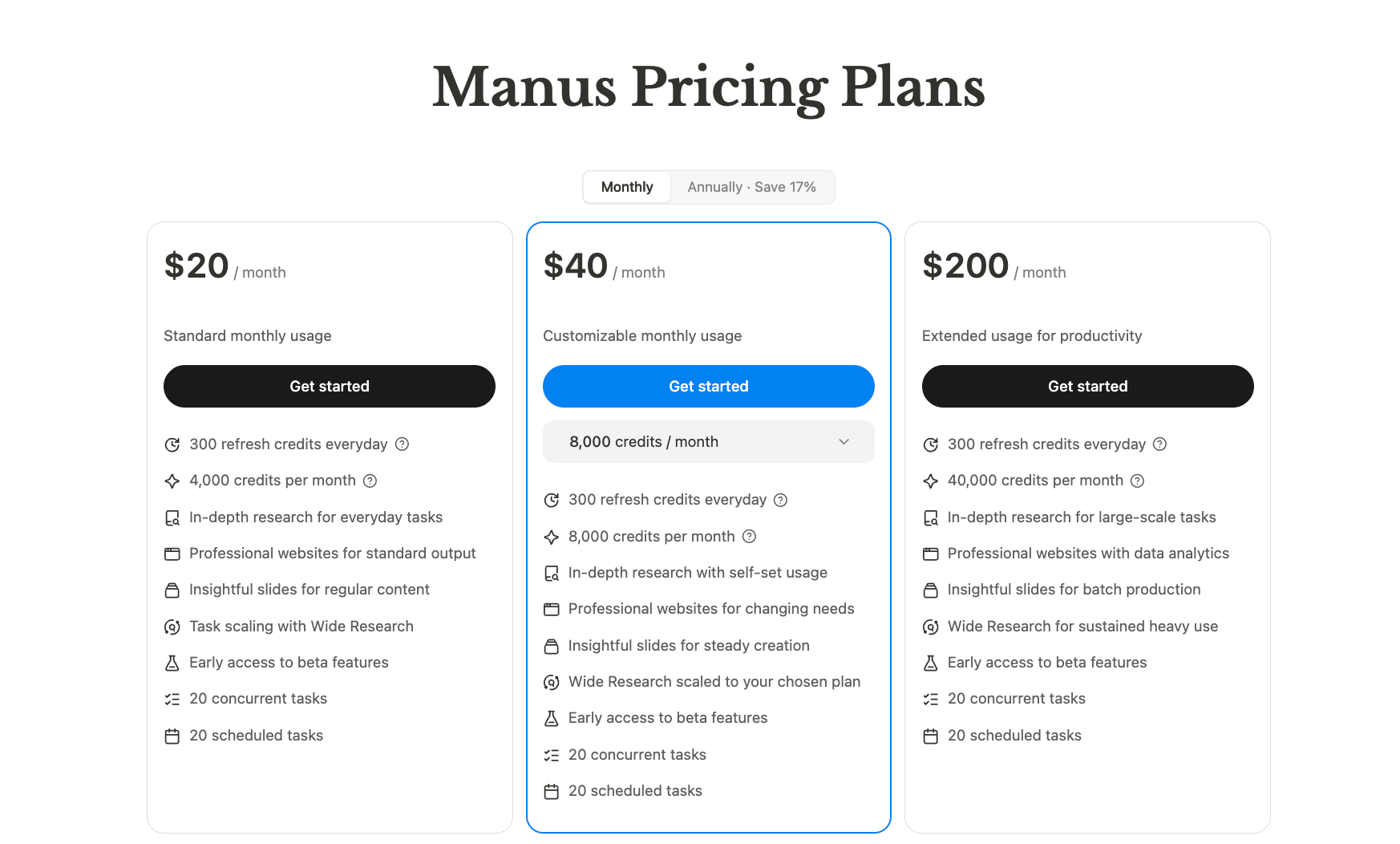
As of August 2026, Manus Pro starts at $20 per month with 4,000 monthly credits. Free users receive daily credits that work only with Manus 1.6 Lite, making the free tier more suitable for testing than sustained heavy use. Credits are consumed by model tokens, virtual machines, and third-party APIs, while the amount used depends on task complexity and duration. There is no reliable conversion from 4,000 credits to a fixed number of reports, decks, or websites.
Monthly credits do not roll over, and a failed run may require another attempt. Total cost includes credits, review time, corrections, and reruns. Manus can offer value when it replaces hours of assembly work, but variable tasks are harder to budget.
Permissions and Sensitive Data Need Deliberate Review
Cloud Browser, Browser Operator, connectors, and My Computer expose different levels of access. Grant only what the task needs, and require human approval before sending messages, changing records, publishing, or touching sensitive systems.
If permission boundaries and runtime ownership matter, architecture becomes part of the buying decision. The comparison between OpenClaw and Manus is less about which agent is universally better and more about cloud convenience versus customization, ownership, and deployment control.
Who Should Use Manus—and Who Should Look Elsewhere?
| Workflow | Manus fit | Why |
|---|---|---|
| Competitive research and structured web collection | Strong | Clear scope, parallel research, and reviewable outputs |
| First-draft decks and data exploration | Strong | Combines analysis, writing, charts, and formatting |
| Rapid websites and prototypes | Strong | Produces a tangible starting point quickly |
| Authenticated browser work | Conditional | Useful, but permissions and manual takeover need attention |
| Recurring operational workflows | Conditional | Evaluate reliability, cost, logging, and recovery needs |
| Regulated or irreversible actions | Weak without strict review | Requires stronger controls and human approvals |
| Fixed-budget, high-volume automation | Weak | Variable credits and reruns make costs harder to predict |
Manus fits best when you can define success and inspect the deliverable. If it misses your requirements, compare Manus alternatives by job category instead of treating every general-purpose agent as interchangeable.
Need More Control for Recurring Agent Work?
Manus prioritizes convenient execution. OpenClaw takes a different route: you can shape models, tools, skills, channels, and the runtime around ongoing work, but self-hosting adds deployment and maintenance.
MyClaw provides managed hosting for a private, always-on OpenClaw agent. It does not duplicate every Manus feature; it fits work where persistence, customization, and runtime control matter more than one-off convenience.
1. Launch a Private OpenClaw Instance
Choose resources on the MyClaw pricing page, then deploy without configuring a VPS or maintaining updates and backups yourself.
2. Connect the Model, Skills, and Channels You Need
Select a model, then connect only the apps, files, browser access, and channels the workflow requires. MyClaw skills can extend the agent for research, automation, coding, data, and communication.
3. Schedule the Work and Review the Results
Set the schedule, define approval boundaries, and inspect outputs before consequential actions. Monitoring, recurring reports, inbox triage, and research can then continue without rebuilding the setup for every run.
Final Verdict: Is Manus Worth It in 2026?
Manus is worth considering when you want a ready-made agent for bounded digital deliverables and prefer speed over infrastructure control. Research, data analysis, presentations, and prototypes are its clearest strengths.
It does not eliminate task scoping, fact-checking, permission management, or cost tracking. Choose Manus when you can define the finish line, review the result, and accept costs that vary by task. Choose a persistent, customizable setup when the workflow must keep running, integrate more deeply, or stay under tighter operational control.
Skip the Setup, Run Best-in-Class AI Agents Now
Launch a managed OpenClaw or Hermes Agent workspace in minutes, with always-on hosting, updates, and support handled by MyClaw.