NotebookLM AI Review: Is It Good for Studying in 2026?

By Emma Reed
MyClaw Editorial
MyClaw
Run Best-in-Class AI Agents Now
Run OpenClaw or Hermes Agent on managed MyClaw hosting, so your AI agent stays online, updated, and ready for real work.
AI Takeaway
- Is NotebookLM good for studying? Yes—especially for turning trusted class materials into cited explanations, study guides, flashcards, quizzes, and review formats. Use it as a study companion, not a replacement for reading, practice, or instructor feedback.
- Is NotebookLM free? Yes. The Standard tier includes 100 notebooks, 50 sources per notebook, 50 chats per day, and limited daily Studio outputs, including three Audio Overviews.
- What are its biggest strengths? Answers stay focused on the sources you choose, citations are easy to check, and the same material can become several useful study formats.
- What are its biggest drawbacks? It can omit or misstate details, does not independently validate source quality, has usage limits, and can encourage passive learning if summaries replace practice.
- Is it worth using? For most source-heavy courses, yes. Start free, verify important claims against the original material, and upgrade only if the quotas interrupt a study method that already works.
What Is NotebookLM—And Why Is It Now Called Gemini Notebook?
Google renamed NotebookLM to Gemini Notebook on July 16, 2026. It remains a standalone research and learning product, now connected more closely with the wider Gemini ecosystem.
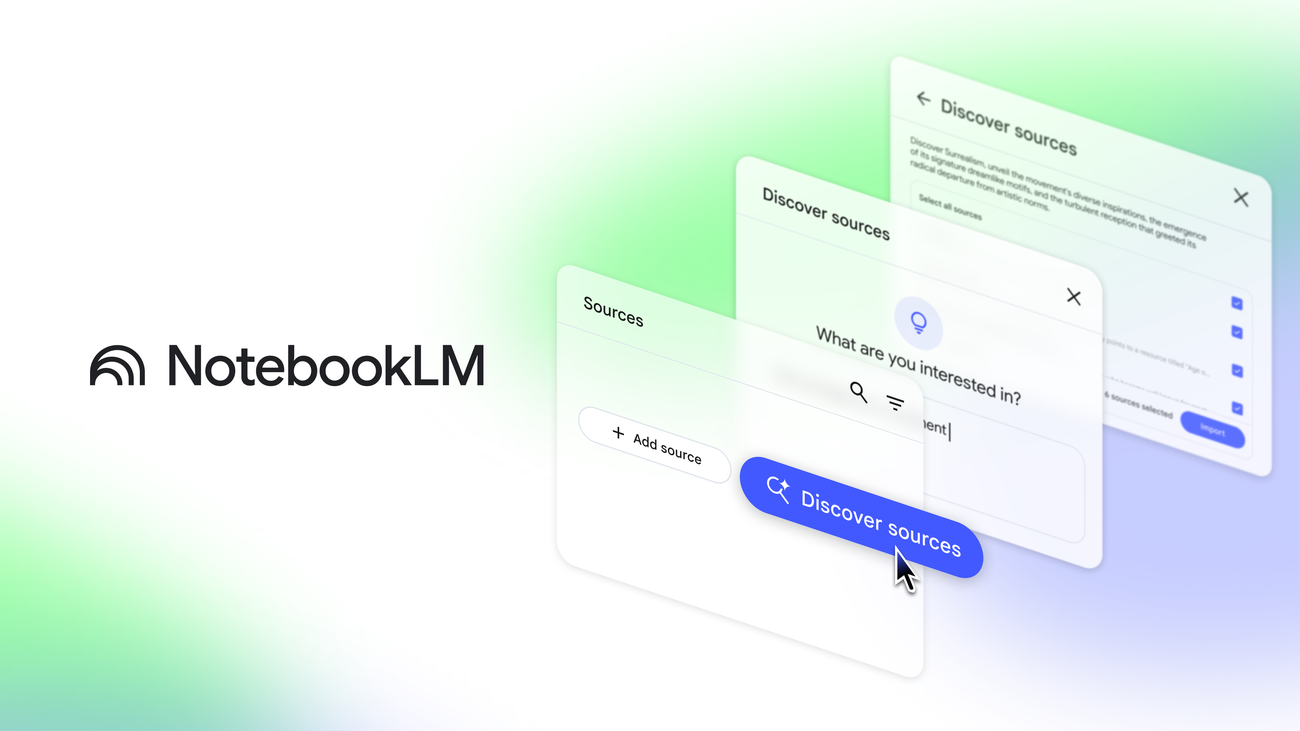
The workflow is simple: create a notebook, add or discover sources, ask questions, and generate study materials. Sources can include documents, slides, webpages, audio, and video.
Unlike a general chatbot, Gemini Notebook answers from the sources selected in the notebook and attaches citations to relevant passages. That makes its output easier to inspect, but not automatically correct. It also differs from an AI agent that carries work across apps or returns to it on a schedule. Our guide to AI agents versus LLMs explains that boundary.
NotebookLM Review: How Well Does It Work for Studying?
Where NotebookLM Helps Most
NotebookLM is most useful when the material is defined. Add lecture notes, papers, textbook chapters, slides, and approved references as a controlled study set.
The chat can explain a difficult passage, compare arguments, find evidence, or break a broad topic into smaller questions. Citations take you back to the source for checking.
Studio turns the same source set into different learning activities. Study Guides organize material, flashcards and quizzes test recall, Mind Maps reveal relationships, and Audio or Video Overviews provide quick orientation. Learning Guide is more interactive: it encourages questions and step-by-step participation instead of only delivering answers.
Where NotebookLM Falls Short
Convenience is also the main risk. A polished overview feels productive, but recognition is not recall. Use summaries for orientation; if they replace reading, problem-solving, or writing from memory, understanding may be shallower than the output suggests.
Source grounding does not eliminate mistakes. NotebookLM can omit an exception, flatten disagreement, or misstate a detail. Incomplete, outdated, or biased sources also produce weak support.
This matters in subjects where the work is the learning. Watching a proof, calculation, lab procedure, or language exercise is not equivalent to completing it.
A Better NotebookLM Study Method
Use NotebookLM inside an active study loop:
- Preview before prompting. Read enough to identify the topic, learning goal, and confusing sections before asking for help.
- Question and verify. Ask specific questions, compare sources, and open the citations behind important answers.
- Retrieve without help. Close the notebook, explain the concept from memory, solve practice questions, and reopen it only to investigate gaps.
AI directs attention; you still do the work required to learn.
Is NotebookLM Free? Current Limits and When to Upgrade
Yes. NotebookLM—now Gemini Notebook—has a free Standard tier for users with a supported Google account. Its current limits are enough for many individual students:
| Standard access | Current limit |
|---|---|
| Notebooks | 100 per user |
| Sources | 50 per notebook |
| Chats | 50 per day |
| Audio and Video Overviews | 3 each per day |
| Reports, flashcards, quizzes, and mind maps | 10 each per day |
| Deep Research | 10 per month |
Each source can contain up to 500,000 words, and local uploads can be up to 200 MB. Limits can change, so check before planning intensive use.
Upgrades come through Google AI plans, qualifying Workspace or Education editions, or Google Cloud. Paid tiers raise quotas and may add earlier access or advanced sharing. Upgrade only when a specific limit repeatedly blocks you; extra capacity has little value if the underlying study method is still unproven.
Pros and Cons of NotebookLM
| Pros | Cons |
|---|---|
| Answers are grounded in a selected source set and include citations. | Grounded answers can still omit, simplify, or misstate details. |
| Study Guides, quizzes, flashcards, mind maps, and overviews are quick to create. | One-click outputs can encourage passive consumption. |
| The free tier covers many ordinary study projects. | Daily quotas may interrupt intensive use. |
| Multiple source and output formats support different learning preferences. | Weak or incomplete sources produce weak support. |
| Notebook sharing can help a class or study group work from common material. | Deleted notes cannot currently be recovered. |
The real advantage is moving between explanation, evidence, and practice without rebuilding context. The central risk is mistaking polished output for mastery.
Accuracy, Privacy, and Other Limits to Know
Treat citations as a verification shortcut, not a guarantee. For important answers, check whether the cited passage supports the wording and whether another source disagrees.
Google says notebook content is not used to directly train its foundational generative AI models unless you provide feedback. Feedback can include prompts, sources, and output related to the reported issue. Eligible Workspace and Education accounts receive additional documented protections.
That policy does not make every upload appropriate. Follow school, employer, copyright, and confidentiality rules before adding restricted material. The broader principles in AI agent security—least privilege, careful source handling, and human review—also apply here.
Practical limits matter too. Copy-protected PDFs may fail to import, oversized files can be rejected, and deleted notes cannot be restored. Back up anything you cannot afford to lose.
Who Should Use NotebookLM—and Who Should Skip It?
Best For
NotebookLM suits source-heavy courses, research projects that compare papers or interviews, and groups that want shared, cited materials. It also helps visual or audio learners who treat generated media as review rather than the source of truth.
If the job extends beyond one notebook into recurring source triage, a focused Summarize skill can condense webpages, PDFs, images, audio, and videos before you decide what deserves deeper attention.
Not the Best Fit For
Do not make it your primary tool if you need guaranteed answers, formal grading, hands-on labs, or detailed symbolic practice. It cannot replace an instructor who can diagnose failed reasoning.
Work that must continuously discover material, update files, operate across apps, or run on a schedule needs a different execution layer.
When Your Research Workflow Needs More Than One Notebook
Gemini Notebook is excellent for understanding a chosen collection, but less suited to research that must keep gathering, organizing, and refreshing information after you leave. One tool does not need to do both jobs.
A hosted MyClaw research agent can handle the persistent layer. MyClaw provides a managed, always-on OpenClaw workspace with tools, files, memory, and scheduled routines. It supports the work around the notebook rather than replacing its study interface.
Step 1: Give the Agent a Focused Research Brief
Define the question, acceptable sources, citation requirements, desired output, and decisions that require human review. Give the agent a narrow assignment, not “find everything about this subject.”
Step 2: Turn New Material Into an Organized Study Queue
Ask the agent to collect relevant material, write short source briefs, and separate required reading from optional background. Save approved findings through the Obsidian skill so notes remain searchable instead of disappearing into downloads and browser tabs.
Step 3: Keep the Knowledge Base Fresh
Schedule checks for new papers, course updates, changed documentation, or other time-sensitive sources. Ask for meaningful changes only, then review each finding before adding it to the study set.
Final Verdict: Is NotebookLM Worth Using?
Yes. NotebookLM is a useful free AI study tool for anyone with a substantial, trustworthy source set. Citations, quizzes, flashcards, Learning Guide, and flexible overviews make difficult material easier to explore.
Its value depends on discipline: verify important answers, practice without assistance, and keep backups. The free tier is the right starting point for most students; pay only when its limits obstruct a workflow that already improves learning.
If the challenge expands from understanding sources to continuously finding, organizing, and refreshing them, compare the operating cost on the MyClaw pricing page. NotebookLM helps you study the notebook; MyClaw keeps the surrounding research workflow moving.
Skip the Setup, Run Best-in-Class AI Agents Now
Launch a managed OpenClaw or Hermes Agent workspace in minutes, with always-on hosting, updates, and support handled by MyClaw.