MiniMax M3
MiniMax M3 is a long-context, multimodal AI model from MiniMax for coding, tool use, browser-style retrieval, and agent workflows.

What MiniMax M3 is designed for
MiniMax M3 is strongest when the task needs long context, code understanding, tool calls, and multimodal input in one workflow.
Coding and software tasks
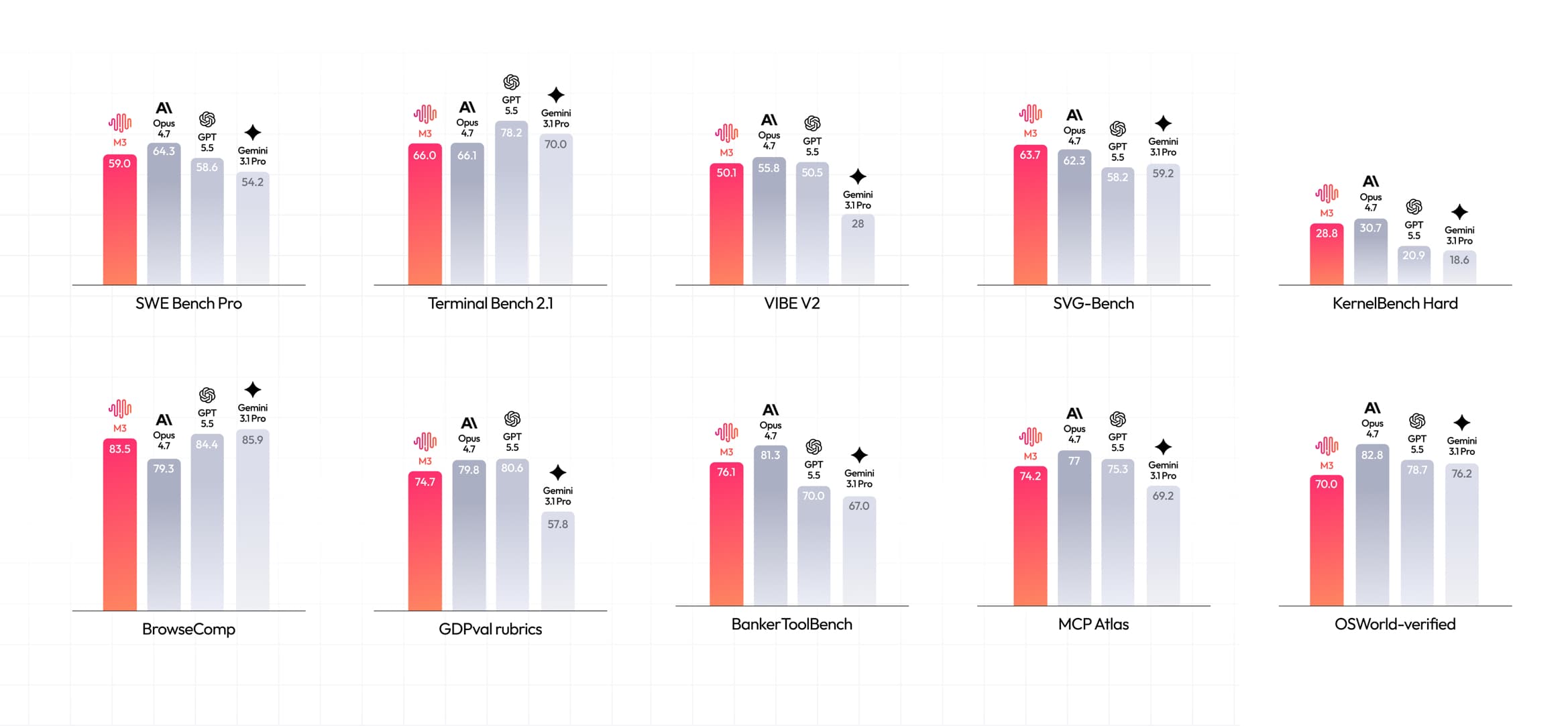
MiniMax reports strong coding benchmark results and positions M3 for repository work, terminal tasks, and implementation-heavy agent workflows.
Long-context reasoning
With up to a 1M-token context window, M3 can work across large codebases, logs, documents, and multi-step task history.
Agent and tool workflows
M3 is built for tasks that combine planning, tool invocation, browsing-style retrieval, and iterative execution.
MiniMax M3 benchmark results
The official MiniMax M3 coding benchmarks cover software engineering, terminal execution, tool use, browsing-style retrieval, and agent tasks.
Use the published scores as model-selection signals, especially when comparing MiniMax M3 for coding and agent workloads.
MiniMax Sparse Attention (MSA)
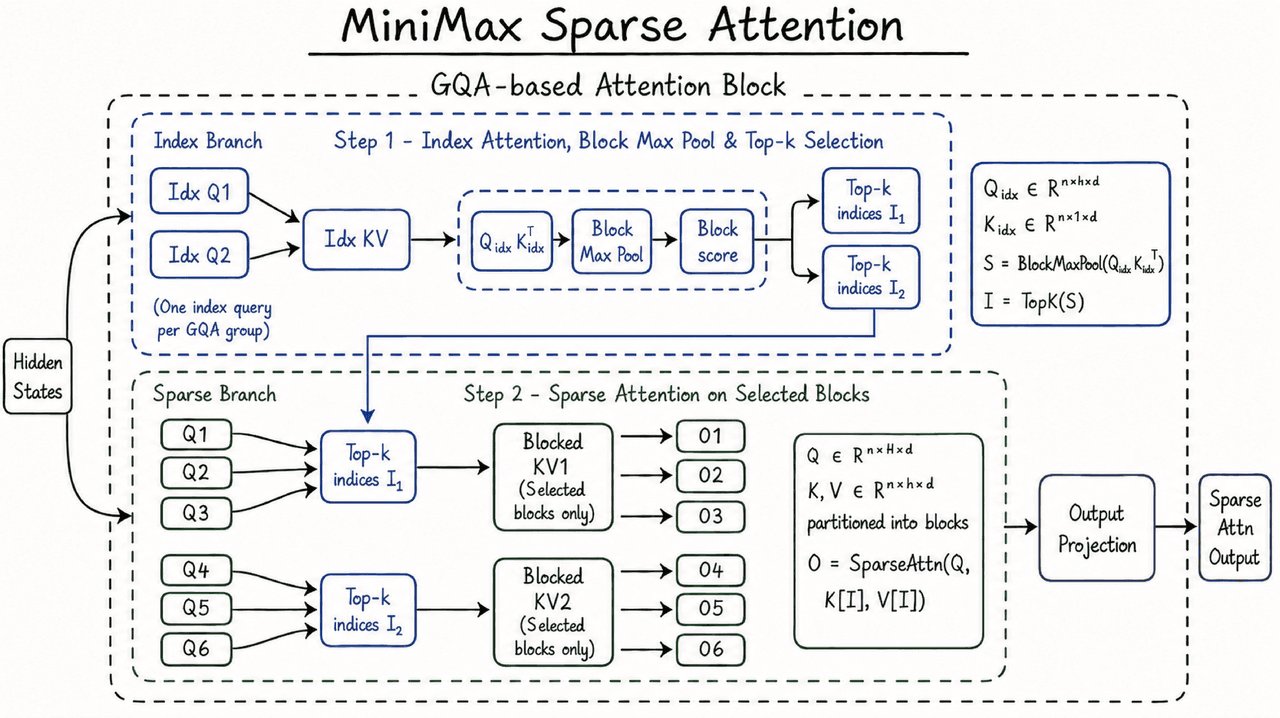
MiniMax M3 combines MiniMax Sparse Attention with long-context training so the model can reason across codebases, tool traces, papers, logs, and multimodal inputs.
MSA is MiniMax's sparse attention architecture for native ultra-long context pretraining. The M3 API supports up to a 1M-token context window, with a guaranteed minimum of 512K tokens, while preserving practical latency and throughput at extreme context lengths.
Long-horizon stability
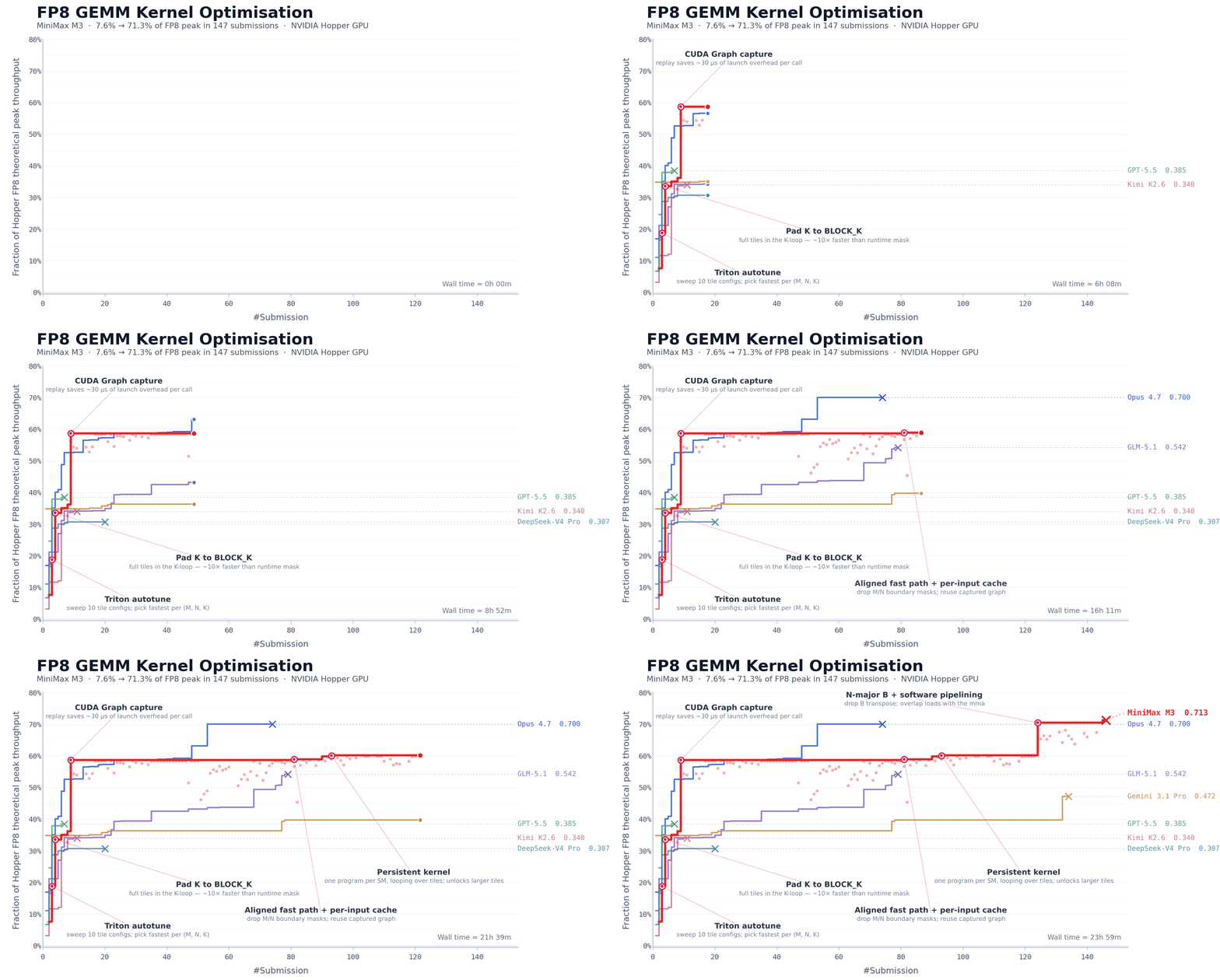
MiniMax highlights M3's ability to keep making progress over extended autonomous runs. In a CUDA kernel optimization task, M3 ran for about 24 hours, made 147 benchmark submissions, used 1,959 tool calls, and kept improving after long performance plateaus.
MiniMax M3 vs MiniMax M2.7
MiniMax M3 is the newer long-context, multimodal coding model. MiniMax M2.7 remains useful for existing text and agent workflows, especially where its stable 204K context window and highspeed variant are already integrated.
| Model comparison | MiniMax M3 | MiniMax M2.7 |
|---|---|---|
| Positioning | Frontier coding and agentic model for tool use, long-context reasoning, multimodal input, and structured task execution. | Earlier M-series model positioned as the start of MiniMax's recursive self-improvement path for existing workflows. |
| Context window | Up to 1,000,000 tokens, with MiniMax stating a guaranteed minimum of 512K tokens for long-context work. | 204,800 tokens on the MiniMax API, giving solid long-context coverage but less room than M3. |
| Input modality | Native multimodal input with text, image, and video support in chat completions. | Text-focused model for chat, coding, search, and tool workflows. |
| Coding and agents | Designed for coding benchmarks, terminal tasks, tool calls, browser-style retrieval, and long-running autonomous work. | Still available for agent and coding workflows, but without M3's million-token and native multimodal emphasis. |
| Speed options | Standard M3 access focuses on stronger capability and 1M context. | Standard M2.7 is listed around 60 tps, with M2.7-highspeed listed around 100 tps. |
| Best first test | Choose M3 when the task needs large repos, screenshots, documents, long tool traces, or multimodal agent sessions. | Choose M2.7 when an existing workflow already depends on it, or when a lighter text-first integration is enough. |
Comparison based on MiniMax's current API documentation and M3 model materials checked on June 4, 2026.
Where MiniMax M3 fits
Repository work
Review large codebases, reason across files, and handle implementation tasks with long context.
Research to execution
Move from source gathering to structured plans and concrete execution.
Multimodal agent tasks
Combine text, screenshots, documents, and tool actions in one workflow.
Model comparison
Compare M3 with other coding and agent-focused models for your workload.
MiniMax M3 FAQs
MiniMax M3
Use MiniMax M3 in a hosted MyClaw agent
Start from a managed workspace, choose MiniMax M3 for coding or long-context workflows, and run the model with tools, files, and browser-ready agent execution.